Case study
Back to projectsJavaScript Notes | Interactive installable guide
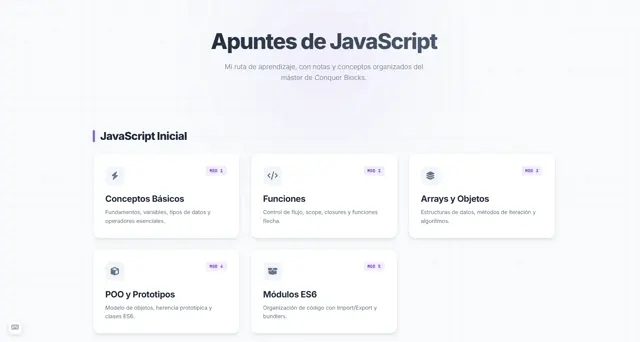
My JavaScript notes turned into an installable web app: global search, review flashcards and code blocks with syntax highlighting.
Starting point
The project before the code
Context
I started the JavaScript module at Conquer Blocks taking notes in Notion. It worked, but it wasn't something I actually enjoyed looking up. I decided to turn them into a website of my own.
Goal
Have a visual, practical and always-available reference of everything I was learning in the JavaScript module, organised by modules and lessons.
It started in Notion
When I reached the JavaScript module of my master’s at Conquer Blocks, I started taking notes in Notion like I always did. It worked, but I knew I wasn’t going to look them up. Notion is comfortable for writing, but it’s not something I actually feel like opening when I want to quickly look something up.
So I decided to do what I enjoy most: build it from scratch.
From notes to app
The first step was organising all the content into a structure that made sense: modules, topics and lessons. From there, the app grew on its own. It started as a quick-reference site and ended up as an installable PWA with a global search, a flashcard system for reviewing, code blocks with syntax highlighting and a copy button, a floating table of contents with scroll spy, and keyboard shortcuts to navigate without touching the mouse.
It also has automatic dark and light mode, careful typography with Inter and JetBrains Mono, and works offline once installed on your phone or computer.
I’d already built similar sites for my English and communication notes. This one is, without a doubt, the best of the three. Precisely because I had prior experience, I was able to organise myself better, move faster and make better decisions from the start.
Days in a state of flow
For several days I was completely immersed in the project. I entered that state where you lose track of time because what you’re doing genuinely matters to you. It wasn’t an obligation — it was something I wanted to exist and that I was going to use myself.
When I finished it, I loved the result. And I still use it.
What I take away
This project reminded me of something important: most of the time it’s better to take the first step and act than to keep thinking about how to do it. I tend to be someone who thinks a lot before starting. Here I just started — and it worked out.
What changed
Lessons learned
Building something for yourself that you'll actually use gives you a completely different kind of energy. When the project matters to you, it doesn't feel like effort — it feels like flow.
Having built similar projects before (English and communication notes) let me move faster and make better decisions from the start. Accumulated experience shows.
Sometimes the first step is the hardest. More often than not, it's better to act and improve as you go than to wait for the perfect moment to start.
Next iteration
Future improvements
- Implement a more advanced search engine with real-time suggestions and category filters to locate concepts even faster.
- Rewrite the style architecture with a more scalable Sass foundation, starting fresh to avoid accumulated technical debt.
- Add personal progress tracking: mark lessons as read and save progress between sessions.