For a long time, I thought of web security as something that came later.
First you make the website work. Then you make it look good. Then you make it fast. Then you think about SEO. And at the end, if there is time, you look at security.
That order makes less sense to me now.
Not because I think every frontend developer has to act like a security auditor. That is not my case. I am learning cybersecurity and I still have a lot to organise. But that is exactly why I want to explain it from a more realistic point of view: what a web developer should start looking at before publishing something.
If a website is going to be online, this is part of the work.
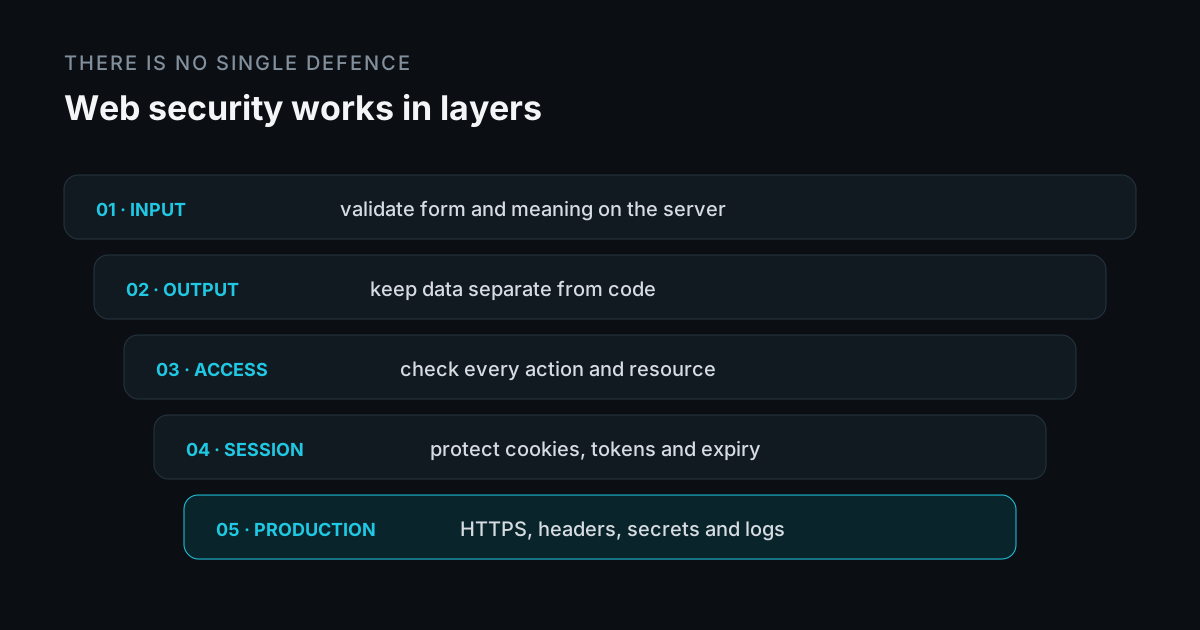
The central idea is simple: web security is not an isolated feature but a system of layers. Validating input, encoding output, checking permissions, protecting sessions and configuring production correctly reduce different risks. No layer replaces the others or guarantees security on its own.
How I see it now
When I rebuilt my portfolio with Astro, I spent a lot of time on performance, technical SEO, page structure, sitemap, structured data and maintenance. All of that had a clear intention: I did not want the site to be just a nice card, but a professional base.
Security feels similar to me.
I do not want to learn security to fill articles with technical words. I care about it because it changes the way I make decisions:
- What data I accept.
- Which scripts I load.
- Which dependencies I install.
- What I store in the browser.
- What I expose in production.
- What someone could do if they modified a request.
- What happens if tomorrow my project stops being just a demo.
That change in perspective matters.
A personal project can start small, but if you publish it, it is on the internet. And on the internet, “only my friends will use it” is not a technical guarantee.
You do not need to know everything to start
A secure website is not a website that is impossible to attack. That does not exist.
A better-designed website is one that avoids known mistakes, limits reasonable damage and does not leave sensitive decisions in the wrong layer.
For me, the point is not knowing the name of every attack. It is asking better questions while building.
For example:
- Does this data come from a trusted source?
- Am I validating in the right place?
- Am I showing user content as text or as HTML?
- Can this user perform this action or are they just logged in?
- Does this dependency deserve to enter the project?
- Am I leaking information in errors, logs or URLs?
- What part of this website is exposed when I publish it?
That already changes a lot.
It does not make you an expert, but it gets you out of a very comfortable way of building: testing only the case where everything goes well.
The browser is not in charge
This is one of the ideas that is changing the way I code the most.
Everything that lives in the browser can be modified. HTML, CSS, JavaScript, hidden fields, required attributes, submitted values, IDs, cookies accessible from JavaScript and requests.
Your interface is a suggested way to use the system. It is not a security boundary.
If a rule matters, it cannot depend only on the frontend.
Examples:
- A
requiredfield improves the experience, but it does not protect the server. - A disabled button does not stop someone from sending the request.
- A hidden field does not protect a price, role or discount.
- A valid ID does not mean the user has permission over that resource.
- JavaScript validation can be bypassed completely.
The frontend helps the user. The backend decides whether the system accepts something.
This separation looks basic, but it is easy to forget when you are focused on making the interface work.
Security means deciding what can enter
Everything that comes from outside should be treated as untrusted.
I am not talking only about a contact form. This also includes URL parameters, API JSON, cookies, headers, uploaded files, third-party data and responses from external services.
Validation does not mean blocking random unusual characters. It means defining what you expect to receive.
There is an important difference between two types of validation:
- Validating shape.
- Validating meaning.
Validating shape means checking that an email looks like an email, that a date has date format or that a number is actually a number.
Validating meaning means checking whether that data makes sense inside the system.
A number can be valid and still be dangerous if it represents a negative amount. An ID can exist and still not belong to the user. A date can be well formatted and still be outside the allowed range.
That second part is what usually separates superficial validation from useful validation.
The OWASP input validation guide makes the same distinction between syntax and semantics and notes that client-side validation can be bypassed. Rules that protect the application need to run where the request is processed.
How information goes out matters too
It is not enough to look at what comes in.
It also matters how you later show that data.
If a user writes text and your application renders it as HTML, the browser may interpret it as instructions. That is where one of the best-known families of problems appears: XSS.
This does not need to become an exploitation lesson. The practical rule is simpler:
Do not mix untrusted data with code.
It is not the same to show data in:
- HTML text.
- An attribute.
- A URL.
- A JavaScript block.
- An email.
Each context has its own rules.
That is why APIs like innerHTML should not be used with content from users or external sources unless you really understand what you are doing.
If you want to show text, treat it as text. If you want to allow rich HTML, you need real sanitisation and a clear list of what is allowed.
The OWASP XSS prevention guide separates defences by output context and recommends safe sinks for text, along with sanitisation when HTML is genuinely allowed.
Login does not mean permission
Authentication and authorisation are not the same thing.
Authentication: knowing who the user is.
Authorisation: knowing what that user is allowed to do.
It sounds theoretical until you start thinking about real endpoints.
A user being logged in does not mean they can delete any project, access any invoice, modify any account or read any resource.
The backend has to check context:
- Who is making the request.
- Which resource they want to touch.
- Who owns that resource.
- Which action they are trying to perform.
- Which permissions they have.
Hiding a button in the interface is not authorisation.
If the endpoint accepts the action without checking permissions, the problem is still there even if the user never sees the button.
OWASP keeps that distinction explicit in its authorisation guide: authenticating an identity does not automatically grant access to every resource and action. Permissions need checking on every request.
Sessions are a sensitive part of the product
When a website has login, sessions become critical.
This includes cookies, tokens, expiration, logout, password recovery, shared devices and browser storage.
Not every decision has a universal answer, but some questions are mandatory:
- Should this cookie be
HttpOnly? - Should it only be sent over HTTPS with
Secure? - Which
SameSitepolicy makes sense? - How long does a session last?
- Where is a token stored?
- What happens if there is XSS?
- What happens if a request is triggered from another site?
Storing tokens in localStorage may feel convenient. But if there is XSS, JavaScript can read them. Using HttpOnly cookies reduces that risk, although it also forces you to think about CSRF and cookie configuration.
I would not reduce this to “always use one thing”. The important part is not choosing out of convenience without understanding which problem you are leaving open.
The OWASP session management guide brings together cookie attributes, expiry and storage decisions that need evaluating for each architecture.
HTTPS is the floor, not the ceiling
HTTPS is mandatory on a professional website.
It protects communication between browser and server from being read or modified in transit. Without that, everything else starts badly.
The OWASP TLS guide describes that transport confidentiality and integrity, as well as its limits when the application itself is flawed.
But HTTPS does not fix:
- Weak validation.
- XSS.
- Broken access control.
- Badly configured cookies.
- Vulnerable dependencies.
- Secrets committed to the repository.
- Exposed admin panels.
- Errors that leak internal information.
HTTPS prevents one class of problems. It does not turn a badly designed application into a secure one.
That is why I see it as something that should be there, not something to brag about.
Headers are not decoration
When I worked on the headers for my website, one thing became clear: many security decisions are not visible in the interface, but they change how the browser behaves.
Headers like Content-Security-Policy, Strict-Transport-Security, X-Content-Type-Options, Referrer-Policy or Permissions-Policy do not make a website secure by themselves.
But they help.
They limit resources, reinforce HTTPS, control information sent to third parties and block capabilities the site does not need.
I explained this in more detail in security headers every web developer should know. In practice, a website should also tell the browser what is allowed and what is not.
Installing dependencies is also a security decision
I develop this part in JavaScript dependencies: the risks you take when installing them, including the pnpm configuration I use on this project and its limits.
In frontend, installing a library to solve almost anything is easy.
I am not saying that is wrong. Many dependencies save time and are maintained by people who know a lot. The problem is installing without thinking.
Every dependency adds code you did not write. And sometimes it adds more dependencies underneath.
Before installing something, it is worth asking:
- Do I really need it?
- What problem does it solve?
- When was it last updated?
- How much dependency chain does it bring?
- Will it touch a sensitive part?
- Can I solve it simply without adding another package?
Reducing unnecessary dependencies is not only a performance decision. It is also maintenance and security.
Errors also speak
A public error should help the user, not explain how the application is built.
It makes no sense to show internal traces, table names, server paths, SQL messages, tokens, environment variables or external provider details.
That belongs in internal logs, and even there you need to avoid storing secrets or unnecessary personal data.
There is a difference between:
We could not process the request.And:
DatabaseError: users.password_hash failed on production-db-01The first message may be less detailed, but it does not give away information. The second helps someone understand where to attack.
The OWASP error handling guide recommends generic responses for users and sufficient detail in internal logs, while keeping secrets and unnecessary sensitive information out of those records.
Publishing a website is also security
Security does not end in the code.
It also lives in how you publish:
- Environment variables.
- Hosting configuration.
- Permissions.
- CORS.
- Redirects.
- Cache.
- Technical files.
- Dependencies.
- Domains.
- Exposed panels.
A website can have good code and bad configuration.
That is why reviewing production feels more important to me now. It is part of the job, not a final formality.
It is not enough for the build to pass. You need to see what is actually exposed.
Things I would check before publishing
I do not mean this as a full audit. It is more like the minimum I would not want to skip if the website is going online.
- HTTPS working on every page.
- Basic headers configured.
- Forms and endpoints validated on the server.
- Permissions checked outside the interface.
- User data displayed safely.
- Sensitive cookies configured properly.
- No secrets in the repository.
- Dependencies justified and updated.
- Public errors without internal details.
- CORS limited to what is necessary.
- Sensitive data out of
localStorageunless it is a conscious decision. - Limits against abuse on exposed actions.
This is not enough to say “this website is secure”. It is enough to avoid publishing completely blind.
Why this topic matters to me
I do not want to talk about web security to pretend I know more than I do.
I care about it because it forces me to build with better judgement.
If I am building professional websites, I cannot look only at design, SEO or performance. I also need to think about what the website accepts, what it shows, what it stores, what it exposes and what someone could do if they do not follow the expected path.
That is the association I care about building with my work: not “I know every vulnerability”, but “I do not publish without thinking about what I am exposing”.
For me, web security starts there.